
My first IoT hacking lab at home
My first IoT hacking lab at home
For a long time I wanted to learn IoT pentesting in a practical way, not just reading papers or doing CTFs, but working with real hardware and reproducing scenarios seen in real audits.
So I set up my first IoT hacking laboratory at home, trying to follow the same workflow that a pentester would use in a real environment:
- first understand the device,
- then extract the firmware,
- and finally attack the communication.
The IoT device: hardware and functionality
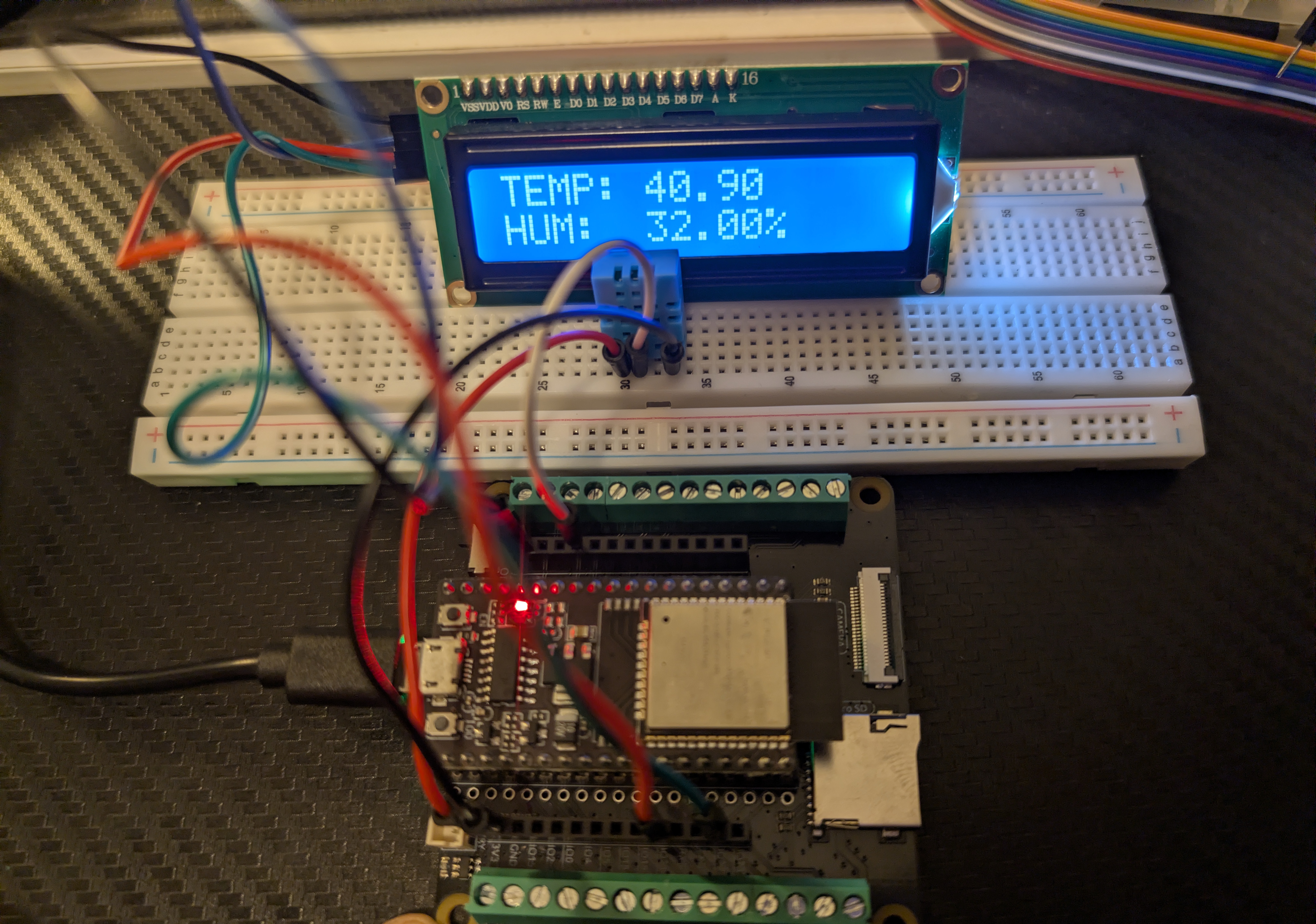
The device I built is something very typical in the IoT world:
Main components:
- ESP32 as microcontroller
- DHT11 sensor for temperature and humidity
- 16x2 LCD with I2C as visible interface
- WiFi + MQTT for communication with a backend
In practice, this resembles:
- thermostats
- weather stations
- home or industrial sensors
Main connections
DHT11:
- VCC → 3.3V
- GND → GND
- DATA → GPIO 14
I2C LCD:
- VCC → 3.3V
- GND → GND
- SDA → GPIO 21
- SCL → GPIO 22
What the device does (normal behavior)
The normal flow of the device is as follows:
- Connects to the WiFi network.
- Connects to an MQTT server (IoT backend).
- Reads temperature and humidity from the sensor.
- Displays the values on the LCD.
- Listens to MQTT messages to receive remote data.
The interesting point is that the device trusts the data it receives via MQTT and treats it as valid.
Vulnerable Code
#include <WiFi.h>
#include <PubSubClient.h>
#include <Wire.h>
#include <LiquidCrystal_I2C.h>
#include "DHT.h"

// ---- WIFI ----
const char* ssid = "YOUR_WIFI_SSID";
const char* password = "YOUR_WIFI_PASSWORD";

// ---- MQTT ----
const char* mqtt_server = "YOUR_MQTT_SERVER";
const char* topic = "casa/salon/temp";

// ---- LCD ----
LiquidCrystal_I2C lcd(0x27, 16, 2);

// ---- DHT ----
#define DHTPIN 14
#define DHTTYPE DHT11
DHT dht(DHTPIN, DHTTYPE);

// ---- MQTT CLIENT ----
WiFiClient espClient;
PubSubClient client(espClient);

// ---- STATE ----
String tempStr = "";
float hum = 0;
bool spoofActive = false;
unsigned long spoofTimestamp = 0;

void callback(char* t, byte* payload, unsigned int length) {
  char msg[32];
  if (length > 31) length = 31;
  memcpy(msg, payload, length);
  msg[length] = '\0';

  tempStr = String(msg); // untrusted data (text)
  spoofActive = true;
  spoofTimestamp = millis();
}

void reconnect() {
  while (!client.connected()) {
    client.connect("esp32-client");
    client.subscribe(topic);
  }
}

void setup() {
  Serial.begin(115200);

  Wire.begin(21, 22);
  lcd.init();
  lcd.backlight();
  dht.begin();

  lcd.print("WiFi...");
  WiFi.begin(ssid, password);
  while (WiFi.status() != WL_CONNECTED) delay(500);

  lcd.clear();
  lcd.print("MQTT...");
  client.setServer(mqtt_server, 1883);
  client.setCallback(callback);
  reconnect();

  lcd.clear();
}

void loop() {
  if (!client.connected()) reconnect();
  client.loop();

  // --- READ SENSOR ---
  if (!spoofActive || millis() - spoofTimestamp > 10000) {
    float t = dht.readTemperature();
    hum = dht.readHumidity();
    tempStr = String(t); // convert real float to text
    spoofActive = false;
  }

  // --- DISPLAY ---
  lcd.setCursor(0, 0);
  lcd.print("TEMP: ");
  lcd.print(tempStr);
  lcd.print(" ");  // clear residue

  lcd.setCursor(0, 1);
  lcd.print("HUM: ");
  lcd.print(hum);
  lcd.print("% ");

  delay(2000);
}
Step 1: firmware extraction (reconnaissance)
Before attacking anything, the first step was to extract the device firmware, simulating a very realistic scenario:
- authorized physical access
- laboratory
- internal audit
- test device
Using esptool.py:
esptool.py --port /dev/ttyUSB0 read_flash 0x000000 0x400000 firmware_dump.bin
0x400000 refers to the 4MB of the device
This generates a complete copy of the ESP32 firmware.
esptool.py --port /dev/ttyUSB0 read_flash 0x000000 0x400000 firmware_dump.bin
esptool.py v3.3.3
Serial port /dev/ttyUSB0
Connecting.......
Detecting chip type... Unsupported detection protocol, switching and trying again...
Connecting....
Detecting chip type... ESP32
Chip is ESP32-D0WD-V3 (revision v3.1)
Features: WiFi, BT, Dual Core, 240MHz, VRef calibration in efuse, Coding Scheme None
Crystal is 40MHz
MAC: 5c:01:3b:9c:9f:08
Uploading stub...
Running stub...
Stub running...
4194304 (100 %)
4194304 (100 %)
Read 4194304 bytes at 0x0 in 380.9 seconds (88.1 kbit/s)...
Hard resetting via RTS pin...
Step 2: firmware analysis and information extraction
With the extracted firmware, the next step was to search for interesting strings:
strings firmware_dump.bin | grep -i mqtt
Here key data appears:
- MQTT server address
- topics used
- internal program messages
For example:
"Wifi Pass": XXX
"Wifi SSID": XXX
casa/salon/temp
This is very important from an IoT pentesting perspective:
The attacker doesn’t guess the MQTT topic, they extract it from the firmware.
This pattern is very common in real devices, where topics and endpoints are hardcoded.
Step 3: MQTT attack (data spoofing)
Once the topic is known, the attack is trivial.
The device subscribes to:
casa/salon/temp
Any client with access to the MQTT server can publish to that topic.
Example:
mosquitto_pub -h <mqtt_server> -t casa/salon/temp -m "IOT PWNED"
Result:
- The ESP32 accepts the message.
- The LCD displays 35°C.
- The real sensor is ignored for a few seconds.
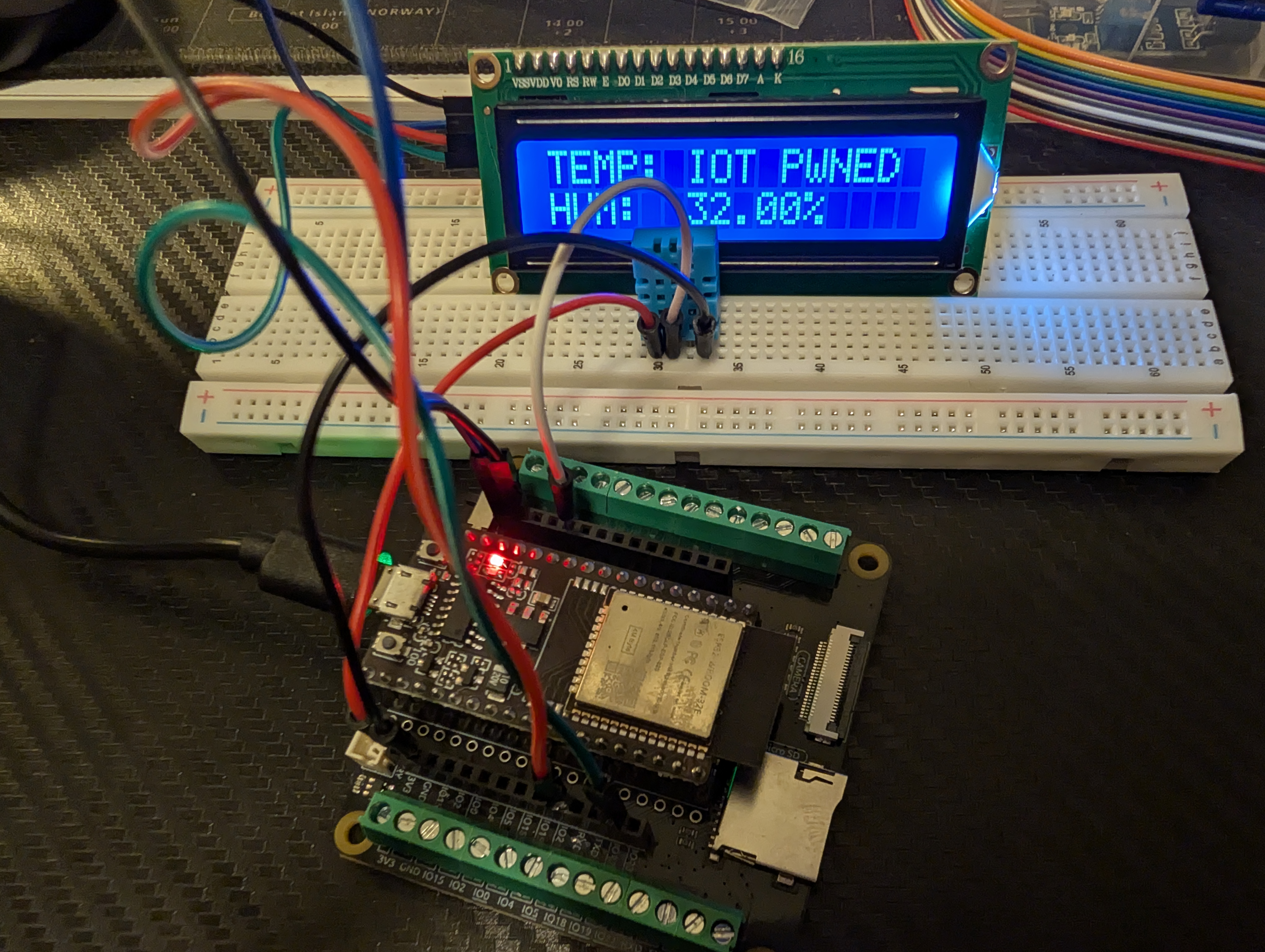
This is a classic Sensor Data Spoofing:
- no exploits
- no code execution
- no authentication
- but with visible and real impact
The design flaw
The problem is not the protocol, but the logic:
tempStr = String(msg); // untrusted data
The device:
- doesn’t validate the origin
- doesn’t validate the type
- doesn’t validate the range
- blindly trusts the backend
This type of flaw is constantly seen in IoT audits.
What this laboratory demonstrates
Although this is a home lab, it reproduces real problems:
- MQTT without authentication: anyone can publish to the topics
- Excessive trust in the backend: data is not validated
- Secrets visible in firmware: topics and configurations are hardcoded
- Physical impact: visible alteration of behavior (LCD)
Conclusions
This laboratory demonstrates that:
-
Firmware extraction is fundamental: it provides critical information about the internal operation of the device.
-
MQTT without authentication is a serious risk: it allows trivial attacks with real impact.
-
Data validation is essential: never trust external data without proper validation.
Thanks for reading!